
Download Lodgit Desk Hotel – Free Hotel Management Software for Windows
Overview – Why Lodgit Desk Hotel Stands Out in the Hospitality Market
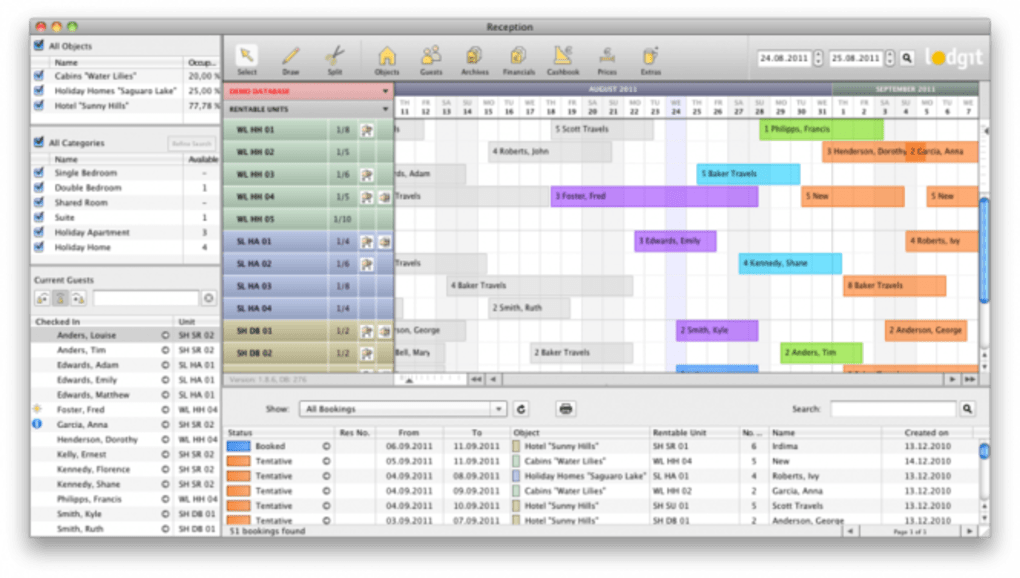
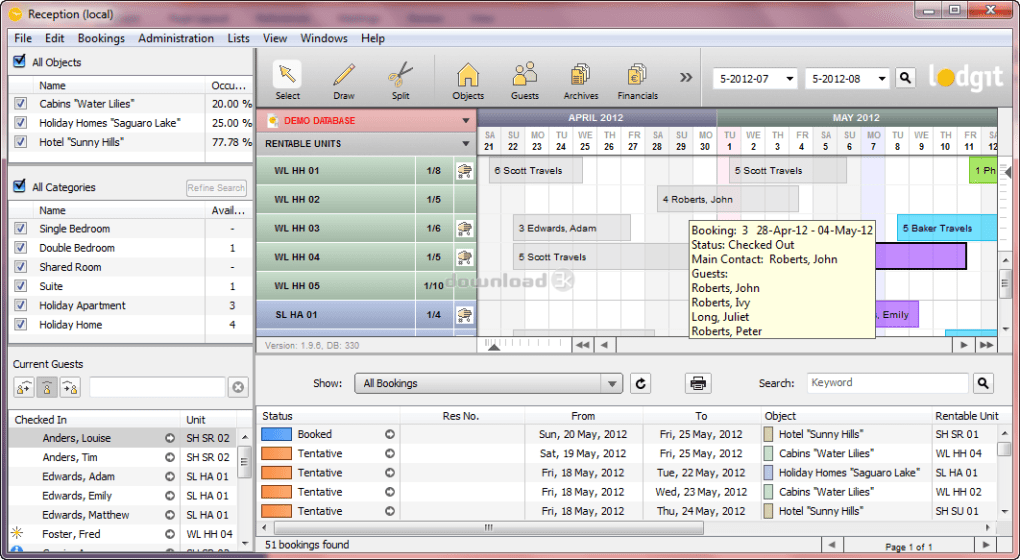
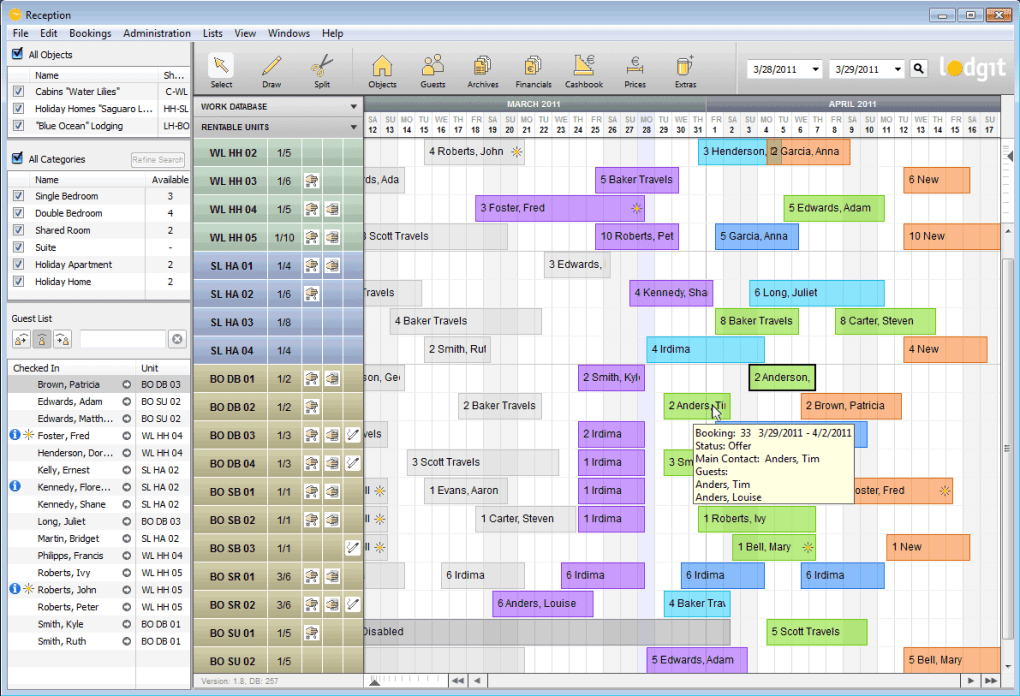
Lodgit Desk Hotel is a cutting‑edge, free hotel management solution designed for small‑to‑medium accommodations such as boutique hotels, guesthouses, vacation apartments, campgrounds, and youth hostels. Built on an integrated SQL database, the application lets you create an unlimited number of rental units, each with its own pricing, availability, and amen‑ities. The graphical reservation schedule gives a clear, at‑a‑glance view of bookings, while built‑in visitor management, billing, and reporting tools turn a simple PC into a full‑featured property management system (PMS). Lodgit Desk offers a 30‑day free personal test license, allowing hoteliers to explore the platform without any upfront cost. Compared with competitors like iHotel, Cheerze, and Newhotel Cloud PMS, Lodgit Desk combines a robust feature set with a zero‑cost entry point, making it an attractive option for operators who need a secure, reliable, and easily updatable tool.
Beyond basic reservation handling, Lodgit Desk automates daily housekeeping lists, generates revenue analysis reports, and calculates critical performance metrics such as occupancy rate and RevPAR (Revenue per Available Room). Its email and letter generation module lets you personalize guest communication, while an export function to popular office suites ensures that all data can be backed up or further processed. In short, Lodgit Desk Hotel delivers a comprehensive, all‑in‑one environment for managing guest interactions, financials, and operational workflow without the need for multiple, disparate applications.
Key Features & Benefits
- Unlimited Rental Units – Add as many rooms, cabins, or apartments as your property requires, each with custom rates, taxes, and seasonal pricing.
- Graphical Reservation Calendar – Drag‑and‑drop bookings, view occupancy trends, and spot conflicts instantly.
- Visitor Management & Check‑In/Check‑Out Lists – Real‑time guest status, notes, and arrival/departure tracking.
- Automated Housekeeping Schedule – Daily, weekly, or monthly cleaning lists generated automatically based on bookings.
- Billing & Invoicing Engine – Create, print, and email invoices; support for multiple payment methods and tax configurations.
- Revenue & Performance Analytics – Occupancy rate, RevPAR, average daily rate (ADR), and agent commission reports.
- Custom Communication Tools – Generate personalized letters, email templates, and archive all correspondence for quick retrieval.
- Data Export & Integration – Export guest lists, financial reports, and occupancy data to CSV, Excel, or PDF for external analysis.
- Secure SQL Backend – Robust database ensures data integrity, fast queries, and easy backup.
- Free 30‑Day Trial – No credit card required; apply for a personal test license to evaluate every feature.
These features translate directly into operational advantages. By centralizing reservations, housekeeping, and billing in one interface, Lodgit Desk reduces manual errors and frees staff to focus on guest experience. The built‑in analytics give owners a clear picture of profitability, enabling data‑driven pricing and marketing decisions. Moreover, the ability to export data means you can integrate Lodgit Desk with existing accounting or channel‑management tools without a costly custom API.
Security is another strong point. The integrated SQL engine stores all guest information locally on your Windows PC, eliminating the need for cloud‑based storage that can be vulnerable to breaches. Regular software updates are delivered via a secure download portal, ensuring you always have the latest bug fixes and feature enhancements. For businesses that value control over their data and want a cost‑effective, feature‑rich PMS, Lodgit Desk Hotel provides an ideal balance.
Installation, Setup, and Daily Usage Guide
Getting Lodgit Desk Hotel up and running is straightforward, even for users with limited IT experience. Follow these steps to install, configure, and start managing bookings on your Windows PC.
Step 1 – Download the Installer
Visit the official Lodgit Desk website and click the “Download Free Trial” button. The file is a standard .exe installer, signed with a digital certificate to guarantee authenticity. Save it to a folder where you keep other software installers.
Step 2 – Run the Installer
Double‑click the LodgitDeskSetup.exe file. The wizard will ask you to accept the license agreement, choose an installation directory (the default C:\Program Files\LodgitDesk is recommended), and select optional components such as the PDF printer driver for invoicing. Click “Install” and wait for the progress bar to finish.
Step 3 – Activate Your Free Personal Test License
After installation, launch Lodgit Desk. The first screen prompts you to enter your name, email, and organization. This information is used to generate a 30‑day test license key, which is emailed to you instantly. Paste the key into the activation dialog and click “Validate.” The application will now unlock all premium modules for the trial period.
Step 4 – Configure Property Settings
Navigate to Settings → Property. Here you can define your property type (hotel, hostel, vacation apartment, etc.), currency, tax rates, and default check‑in/check‑out times. Use the “Add Unit” button to create each room or cabin, assigning a unique code, description, and base price. You can also upload photos for each unit, which appear in the reservation calendar.
Step 5 – Create Users and Permissions
If you have multiple staff members, go to Settings → Users. Create accounts for receptionists, housekeeping supervisors, and accountants. Assign role‑based permissions so each user only sees the screens they need – for example, housekeeping staff can view the daily cleaning list but not financial reports.
Step 6 – Start Taking Reservations
Open the main calendar view. Click on an empty slot, select the unit, enter guest details (name, contact, special requests), and set the stay dates. The system automatically calculates the total cost, taxes, and any extra services (breakfast, airport shuttle, etc.). Press “Save” and the reservation appears instantly on the calendar and in the “Upcoming Arrivals” list.
Daily operations are simplified with built‑in shortcuts: the “Housekeeping” tab generates a printable cleaning schedule each morning, while the “Billing” module lets you issue invoices, accept payments, and send email receipts with a single click. All actions are logged, so you can audit changes or retrieve past communications from the searchable archive.
When the 30‑day trial ends, you have the option to purchase a full license directly from the application’s “License” menu. The upgrade process retains all your data, so there is no interruption to your business workflow.
Compatibility, Pros & Cons, and Expert Review
Lodgit Desk Hotel is a native Windows application. It runs on Windows 10, Windows 11, and Windows Server editions (2016, 2019, 2022). The software does not require .NET Core or additional runtimes, making it lightweight and fast on modest hardware (2 GB RAM, 1 GHz processor). While a Windows‑only solution may limit users on macOS or Linux, the program can be accessed through remote desktop or virtual machines, ensuring flexibility for multi‑platform environments.
Pros
- Completely free 30‑day trial with no credit‑card requirement.
- Unlimited rental units and custom rate structures.
- Intuitive graphical calendar that reduces booking errors.
- Robust reporting engine for occupancy, revenue, and agent performance.
- Integrated housekeeping schedule and automated cleaning lists.
- Secure local SQL database – full control over guest data.
- Easy export to Excel, CSV, and PDF for external analysis.
- Role‑based user management enhances staff security.
Cons
- Windows‑only; no native macOS, Linux, or mobile apps.
- Initial setup requires manual entry of each unit, which can be time‑consuming for large properties.
- Advanced channel‑management integrations (e.g., Booking.com, Airbnb) are not built‑in and need third‑party connectors.
- Limited cloud backup – users must configure their own backup strategy.
- Customer support is email‑based; no live chat or phone line.
Overall Rating: 4.2/5
Lodgit Desk Hotel delivers a surprisingly powerful suite of tools for a free, Windows‑only solution. Its strengths lie in the depth of its reservation and reporting modules, which rival many paid PMS platforms. The lack of native cloud or mobile access is a drawback for properties that rely on on‑the‑go management, but the secure local database and zero‑cost entry point make it an excellent starting point for independent hoteliers looking to modernize their operations without large upfront investments.
Frequently Asked Questions
Is Lodgit Desk Hotel truly free for the trial period?
Yes. You can download and use the full-featured version for 30 days without providing a credit card. A personal test license key is emailed to you after you submit your contact information.
Can I migrate my data to another PMS after using Lodgit Desk?
Absolutely. All data is stored in a standard SQL database, and the software includes export functions to CSV, Excel, and PDF. These files can be imported into most other property management systems.
What security measures protect guest information?
Guest data resides locally on your Windows PC within an encrypted SQL database. The installer is digitally signed, and all updates are delivered over HTTPS to prevent tampering.
Does Lodgit Desk support multiple languages?
The core interface is currently available in English and Spanish. Additional language packs may be released in future updates.
Can I integrate Lodgit Desk with online travel agencies (OTAs)?
Direct OTA integration is not built‑in, but you can use third‑party middleware or export daily booking feeds to synchronize with platforms like Booking.com or Airbnb.
What happens after the 30‑day trial expires?
You will need to purchase a full license through the application’s License menu. The upgrade retains all your existing data and settings, so there is no disruption to your operations.
Conclusion & Call to Action
Lodgit Desk Hotel delivers a comprehensive, free‑to‑try hotel management experience that rivals many paid PMS solutions. Its unlimited unit handling, visual reservation calendar, and powerful reporting tools empower independent hoteliers to streamline daily operations, improve occupancy, and boost revenue—all from a secure Windows desktop. While the lack of native mobile or cloud components may be a limitation for some, the software’s open‑source‑style SQL backend and straightforward export capabilities ensure you can grow or migrate as your business evolves.
If you’re looking for a cost‑effective way to digitize reservations, housekeeping schedules, and billing without committing to a subscription, Lodgit Desk Hotel is worth a hands‑on test. Download the free 30‑day trial today, set up your property, and experience firsthand how a modern PMS can transform your hospitality workflow.
Click here to download Lodgit Desk Hotel now and start managing your accommodation with confidence.







